While Netflix stands out as a premier video streaming service, it's far from flawless. A handful of apps and browser extensions step in to bridge those shortcomings, elevating your viewing pleasure.
We have previously featured several apps that improve Netflix (see our article on 5 Apps That Make Netflix Even Better for Newcomers), and we offer a comprehensive Netflix guide (Everything You Ever Wanted to Know About Netflix). Yet even after mastering those resources, Netflix still presents hurdles that users need solutions for.
Whether you need a thorough catalog of all Netflix content or a simple method to snip and share moments from a show, these tools deliver.
1. Flixable (Web): The Ultimate Netflix Library You've Been Searching For
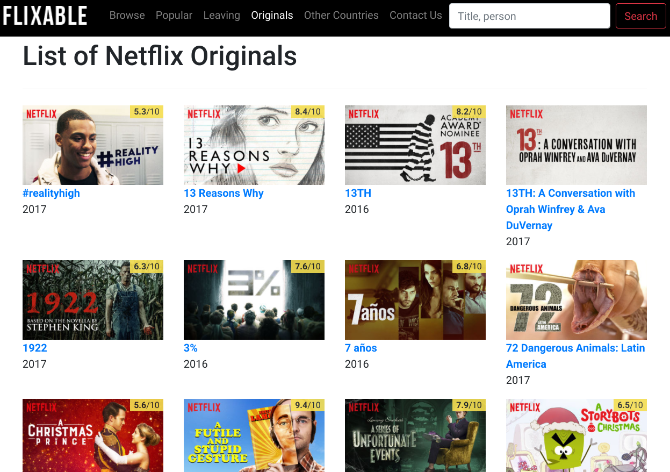
Netflix boasts that its interface simplifies discovering what to stream next. However, it lacks a straightforward, browsable list of every movie, TV series, and documentary available. A devoted fan stepped in to create the catalog Netflix itself ought to offer.
Flixable keeps things remarkably straightforward. It monitors every new title Netflix adds and offers intuitive filters to sort them—by genre, IMDb score, release year, and more—along with multiple ordering options. The "Originals" tab is particularly handy for discovering underrated Netflix originals (10 Underrated Netflix Originals You Might Have Missed). Additionally, you can instantly check which films and series are leaving Netflix at month's end.
At present, Flixable is available in the United States, United Kingdom, Canada, Finland, Germany, and the Netherlands. According to the developer, support for additional countries is on the way.
2. Simkl Enhancer (Chrome): Unlock Hidden Codes, Episode Alerts, Watchlist, and Extra Features
You may not be aware that Netflix hides a set of secret codes and categories (20 Hidden Netflix Codes to Discover Fresh Content). Oddly, the platform itself doesn't display them. However, a straightforward Chrome extension lets you navigate those hidden categories effortlessly.
This extension runs on Simkl's engine. Initially, it scans your Netflix viewing history. Once that data is stored in Simkl's database, it can notify you when a new episode of a show you follow drops, or suggest movies tailored to your tastes. Crucially, it automatically maintains a catalog of everything you've watched.
Simkl also includes the previously mentioned feature for exploring secret categories. You can filter by TV series, anime, or films, then select the desired code. Additionally, the extension offers a "random movie recommendation" based on your preferences, reminiscent of the classic Netflix Roulette tool (6 Essential Tools to Maximize Netflix).
Download: Enhancer for Netflix for Chrome (Free)
3. Projections.io (Chrome, iOS): Capture and Share the Last 20 Seconds of Any Scene
TV series and films frequently contain scenes you'd love to share with friends. Projections.io offers the simplest method to do exactly that. A single click generates a clip covering the previous 20 seconds of your Netflix stream.
Here's how to use it: Install the Chrome extension or the iOS app. While watching Netflix, when a moment strikes you, click the Projections.io icon. The video pauses, and the app instantly crafts a clip of the most recent 20 seconds. If subtitles were enabled, they'll be included. You can then share the clip with anyone.
The main drawback is that the clip resides on Projections.io's website. It can be embedded on other sites, and anyone can watch it without an account. However, it would be even better if you could turn it into a GIF (Top Sites and Apps for Finding, Making, or Editing GIFs) for sharing.
Download: Projections.io for Chrome | iOS (Free)
4. Rave (Android, iOS): Watch Netflix Together and Chat in Real Time
Looking to stream Netflix simultaneously with a distant friend while chatting? Rave is a straightforward mobile app that enables exactly that—and it functions across different countries.
It couldn't be simpler. Launch the app, log into Netflix, and begin playing a video. You can generate a public link for anyone to join or keep it private for invited friends. After they join, a chat window appears beneath the video. The video itself is somewhat small, which can be a nuisance. The experience is smoother on a tablet than on a phone.
Keep in mind that Netflix's library varies by region (How to Access All Netflix Content Regardless of Your Location). Ensure the title you choose is accessible in both your country and your friend's.
Beyond Rave, there are alternative methods to enjoy Netflix with friends (9 Methods to Watch Netflix with Distant Friends). Netflix Party works great if you're using Chrome on a computer.
Download: Rave for Android | iOS (Free)
5. Video Adjust for Netflix (Chrome): Tweak Brightness, Saturation, and Contrast
Your computer screen's brightness, saturation, and contrast significantly influence video appearance. Unfortunately, Netflix doesn't adapt its video output to your monitor's calibration (5 Web-Based Tools for Monitor Calibration). This extension hands you additional control.
The standout feature of Video Adjust for Netflix is the live before-and-after preview while you adjust settings—this greatly influences how much you fine-tune. It also leverages hardware acceleration to apply changes instantly, preventing any strain on your internet bandwidth.
Video Adjust retains your settings per video, so you won't need to reconfigure them repeatedly. It's a straightforward tool that seamlessly enhances your watching experience. Netflix ought to integrate this functionality natively.
Download: Video Adjust for Netflix (Free)
What Issues Should Netflix Address First?
Every one of these apps and extensions shares a common goal: to address shortcomings that Netflix itself should resolve. They're akin to VPN extensions that continue to function (VPNs That Still Function with Netflix), enabling you to stream content from any location.
Which Netflix flaw would you like to see resolved most urgently?